安装compton
sudo apt install compton修改配置文件
compton的配置文件在~/.config/compton.conf
因为有些窗口的阴影有时候会变的很奇怪,大概你有可能需要修改一下,附上我的:
################################### Backend################################## # Backend to use: "xrender" or "glx".# GLX backend is typically much faster but depends on a sane driver.backend = "glx"; ################################### GLX backend################################## glx-no-stencil = true; # GLX backend: Copy unmodified regions from front buffer instead of redrawing them all.# My tests with nvidia-drivers show a 10% decrease in performance when the whole screen is modified,# but a 20% increase when only 1/4 is.# My tests on nouveau show terrible slowdown.# Useful with --glx-swap-method, as well.glx-copy-from-front = false; # GLX backend: Use MESA_copy_sub_buffer to do partial screen update.# My tests on nouveau shows a 200% performance boost when only 1/4 of the screen is updated.# May break VSync and is not available on some drivers.# Overrides --glx-copy-from-front.# glx-use-copysubbuffermesa = true; # GLX backend: Avoid rebinding pixmap on window damage.# Probably could improve performance on rapid window content changes, but is known to break things on some drivers (LLVMpipe).# Recommended if it works.# glx-no-rebind-pixmap = true; # GLX backend: GLX buffer swap method we assume.# Could be undefined (0), copy (1), exchange (2), 3-6, or buffer-age (-1).# undefined is the slowest and the safest, and the default value.# copy is fastest, but may fail on some drivers,# 2-6 are gradually slower but safer (6 is still faster than 0).# Usually, double buffer means 2, triple buffer means 3.# buffer-age means auto-detect using GLX_EXT_buffer_age, supported by some drivers.# Useless with --glx-use-copysubbuffermesa.# Partially breaks --resize-damage.# Defaults to undefined.glx-swap-method = "undefined"; ################################### Shadows################################## # Enabled client-side shadows on windows.shadow = true;# Don't draw shadows on DND windows.no-dnd-shadow = true;# Avoid drawing shadows on dock/panel windows.no-dock-shadow = true;# Zero the part of the shadow's mask behind the window. Fix some weirdness with ARGB windows.#clear-shadow = true;# The blur radius for shadows. (default 12)shadow-radius = 5;# The left offset for shadows. (default -15)shadow-offset-x = -5;# The top offset for shadows. (default -15)shadow-offset-y = -5;# The translucency for shadows. (default .75)shadow-opacity = 0.5; # Set if you want different colour shadows# shadow-red = 0.0;# shadow-green = 0.0;# shadow-blue = 0.0; # The shadow exclude options are helpful if you have shadows enabled. #Due to the way compton draws its shadows, certain applications will have visual glitches # (most applications are fine, only apps that do weird things with xshapes or argb are affected). # This list includes all the affected apps I found in my testing. #The "! name~=''" part excludes shadows on any "Unknown" windows, this prevents a visual glitch with the XFWM alt tab switcher.#此处加入排除阴影的程序名字shadow-exclude = [ "! name~=''", "name = 'Notification'", "name = 'Plank'", "name = 'Docky'", "name = 'Kupfer'", "name = 'xfce4-notifyd'", "name *= 'VLC'", "name *= 'compton'", "name *= 'gedit'", "name *= 'Archive Manager'",# "name *= 'Chromium'",# "name *= 'Chrome'",# "name *= 'Firefox'", "class_g = 'Conky'", "class_g = 'Kupfer'", "class_g = 'Synapse'", "class_g ?= 'Notify-osd'", "class_g ?= 'Cairo-dock'", "class_g ?= 'Xfce4-notifyd'", "class_g ?= 'Xfce4-power-manager'"];# Avoid drawing shadow on all shaped windows (see also: --detect-rounded-corners)shadow-ignore-shaped = false; ################################### Opacity################################## ################################### Fading################################## # Fade windows during opacity changes.fading = true;# The time between steps in a fade in milliseconds. (default 10).fade-delta = 4;# Opacity change between steps while fading in. (default 0.028).#fade-in-step = 0.03;# Opacity change between steps while fading out. (default 0.03).#fade-out-step = 0.03;# Fade windows in/out when opening/closing#no-fading-openclose = true; # Specify a list of conditions of windows that should not be faded.#fade-exclude = [ ];fade-exclude = [ ]; ################################### Other################################## # Try to detect WM windows and mark them as active.mark-wmwin-focused = true;# Mark all non-WM but override-redirect windows active (e.g. menus).mark-ovredir-focused = true;# Use EWMH _NET_WM_ACTIVE_WINDOW to determine which window is focused instead of using FocusIn/Out events.# Usually more reliable but depends on a EWMH-compliant WM.use-ewmh-active-win = true;# Detect rounded corners and treat them as rectangular when --shadow-ignore-shaped is on.detect-rounded-corners = true; # Detect _NET_WM_OPACITY on client windows, useful for window managers not passing _NET_WM_OPACITY of client windows to frame windows.# This prevents opacity being ignored for some apps.# For example without this enabled my xfce4-notifyd is 100% opacity no matter what.#detect-client-opacity = true; # Specify refresh rate of the screen.# If not specified or 0, compton will try detecting this with X RandR extension.refresh-rate = 0; # Set VSync method. VSync methods currently available:# none: No VSync# drm: VSync with DRM_IOCTL_WAIT_VBLANK. May only work on some drivers.# opengl: Try to VSync with SGI_video_sync OpenGL extension. Only work on some drivers.# opengl-oml: Try to VSync with OML_sync_control OpenGL extension. Only work on some drivers. # opengl-swc: Try to VSync with SGI_swap_control OpenGL extension. Only work on some drivers. #Works only with GLX backend. Known to be most effective on many drivers. #Does not actually control paint timing, only buffer swap is affected, #so it doesn’t have the effect of --sw-opti unlike other methods. Experimental. # opengl-mswc: Try to VSync with MESA_swap_control OpenGL extension. Basically the same as opengl-swc above, except the extension we use.# (Note some VSync methods may not be enabled at compile time.)vsync = "opengl-swc"; # Enable DBE painting mode, intended to use with VSync to (hopefully) eliminate tearing.# Reported to have no effect, though.dbe = false;# Painting on X Composite overlay window. Recommended.paint-on-overlay = true; # Limit compton to repaint at most once every 1 / refresh_rate second to boost performance.# This should not be used with --vsync drm/opengl/opengl-oml as they essentially does --sw-opti's job already,# unless you wish to specify a lower refresh rate than the actual value.sw-opti = false; # Unredirect all windows if a full-screen opaque window is detected, to maximize performance for full-screen windows, like games.# Known to cause flickering when redirecting/unredirecting windows.# paint-on-overlay may make the flickering less obvious.unredir-if-possible = false; # Specify a list of conditions of windows that should always be considered focused.focus-exclude = [ ]; # Use WM_TRANSIENT_FOR to group windows, and consider windows in the same group focused at the same time.detect-transient = true;# Use WM_CLIENT_LEADER to group windows, and consider windows in the same group focused at the same time.# WM_TRANSIENT_FOR has higher priority if --detect-transient is enabled, too.detect-client-leader = true; ################################### Window type settings################################## wintypes:{ tooltip = { # fade: Fade the particular type of windows. fade = true; # shadow: Give those windows shadow shadow = false; # opacity: Default opacity for the type of windows. opacity = 0.85; # focus: Whether to always consider windows of this type focused. focus = true; };};关闭xfce4自带的合成器
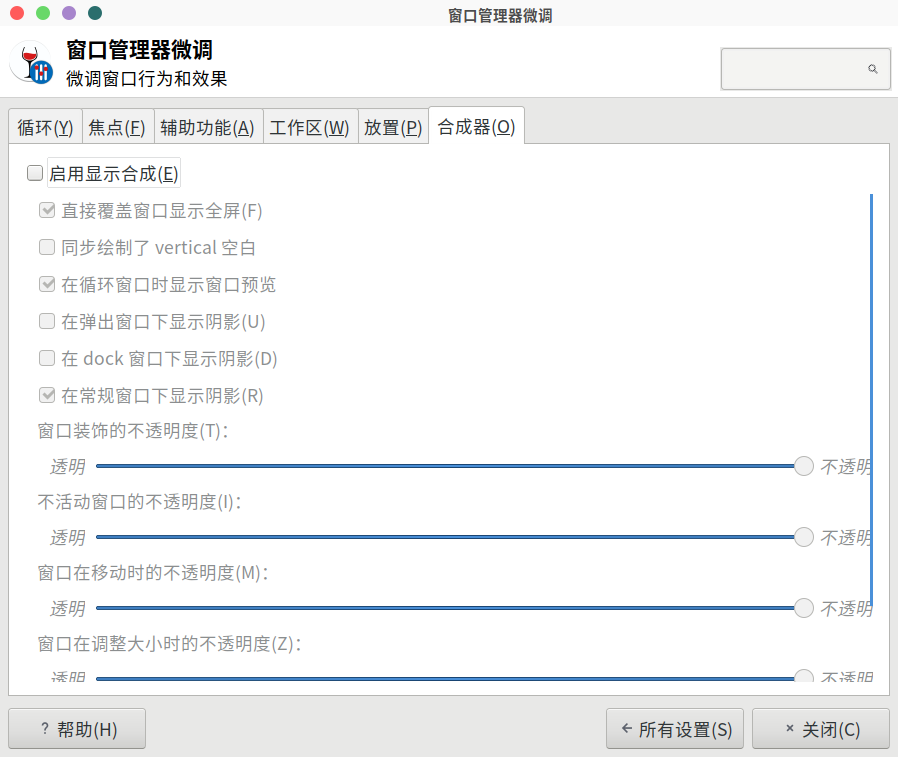
设置管理器->窗口管理器微调->合成器
启动compton
前台运行
compton后台运行
compton -b开机自启动
修改~/.xprofile文件
将compton -b直接加到新的一行就行了
0 条评论